Introduction
How SikkerKey stores secrets, authenticates machines, and controls access.
SikkerKey is a cloud secrets vault. You store encrypted secrets in your vault, organize them into projects, register machines, and grant those machines access to specific secrets. Machines authenticate using Ed25519 signatures on every request. Each project has its own independently generated encryption key, and every secret is wrapped in three layers of AES-256 encryption.
Core Concepts
Your vault is built from four objects:
Secrets are encrypted values stored in a project. SikkerKey has four secret types:
- Secrets store a single encrypted value (an API key, a token, a connection string). Optionally, you can enable automatic rotation so SikkerKey generates a new value on a schedule.
- Structured secrets store multiple named fields as a single encrypted unit (e.g. host, username, password). Individual fields can be read and rotated independently. Automatic rotation can be enabled per-field.
- Managed secrets are database credentials that SikkerKey rotates on a schedule and pushes to your database automatically via a CLI agent. The agent runs locally next to your database, so the database is never exposed to the internet.
- TTL secrets are one-time self-destructing secrets for sharing credentials securely. The recipient gets a link and passphrase. The secret is destroyed after one view attempt, a wrong passphrase, or expiry. Machines cannot access TTL secrets.
Machines are registered devices that can read secrets programmatically. Each machine has an Ed25519 keypair. The private key stays on the machine, the public key is stored in SikkerKey. A machine must be both approved and enabled before it can authenticate.
Access grants map a specific machine to a specific secret. If the grant doesn't exist, the machine cannot read that secret. There is no wildcard access. Every machine-to-secret relationship is explicit.
Projects group secrets into logical environments (e.g. "production", "staging"). Each project has its own independent encryption key. Machines are added to projects, but project membership alone does not grant secret access. You must still grant the machine access to individual secrets within the project.
Encryption
SikkerKey uses three-layer envelope encryption. Each project is independently encrypted with its own master key.
Per-project master keys. When you create a project, a random 32-byte AES-256 master key is generated and stored encrypted. Each project's key is independent. Compromising one has no effect on others.
Per-secret data keys. When you create a secret:
- A random 32-byte AES-256 data key is generated
- The secret value is encrypted with this data key using AES/GCM/NoPadding with a 12-byte IV, 128-bit authentication tag, and the secret ID as AAD (Additional Authenticated Data)
- The data key is encrypted (wrapped) with the project's master key (also AES-256-GCM)
- The raw data key is zeroed from memory in a
finallyblock - Both the encrypted value and the encrypted data key are stored in the database
The AAD binding means an encrypted blob cannot be copied from one secret's database row to another. Decryption will fail because the secret ID won't match.
When a machine reads a secret:
- The project's master key is loaded and decrypted
- The encrypted data key is decrypted using the master key
- The encrypted value is decrypted using the data key with the secret ID as AAD
- All key material is zeroed from memory
- The plaintext is returned over HTTPS
What an Attacker Needs
To read a single secret, an attacker needs all of the following simultaneously:
-
A registered machine's Ed25519 private key. This key is generated on the machine during bootstrap and never leaves it. It is stored at
~/.sikkerkey/vaults/{vaultId}/private.pemwithchmod 600permissions. SikkerKey only stores the public key. -
That machine must be approved and enabled. A machine that has been registered but not yet approved by the vault owner in the dashboard cannot authenticate. A machine that has been disabled is also rejected immediately.
-
That machine must be added to the project. Machines are explicitly added to projects by the vault owner. A machine that exists in your vault but has not been added to a specific project cannot access any secrets in that project.
-
That machine must have an explicit grant to the specific secret. Adding a machine to a project does not give it access to anything. You must separately grant access to individual secrets. There is no wildcard, no "grant all", no inheritance.
-
The vault owner's account must be active. If the account is suspended, all machine access across the entire vault is blocked immediately.
A compromised machine key is useless without approval, project membership, and a per-secret grant. Each project has its own independent master key. Compromising one project has zero effect on other projects, even within the same vault.
Machine Authentication
Machines do not use tokens, API keys, or sessions. Each machine holds an Ed25519 private key generated during bootstrap. The corresponding public key is stored in SikkerKey.
Every request includes four headers:
| Header | Value |
|---|---|
X-Machine-Id | The machine's UUID |
X-Timestamp | Unix epoch seconds |
X-Nonce | Random base64 string (16 bytes) |
X-Signature | Ed25519 signature (base64) |
The signed payload is the string {method}:{path}:{timestamp}:{nonce}:{bodyHash} where bodyHash is the SHA-256 hex digest of the request body (empty string for GET).
The server verifies the request in order:
- Lockout check: 3 failed attempts from the same IP within 5 minutes triggers a 30-minute lockout
- Header presence: all four headers must be present
- Machine lookup: the machine ID must exist, be approved, and be enabled
- Signature verification: the signed payload is verified against the machine's stored Ed25519 public key
- Timestamp window: the timestamp must be within 5 minutes of server time (1 minute of forward clock skew allowed)
- Nonce uniqueness: the nonce (scoped to the machine ID) must not have been seen before. Nonces are tracked in the database and survive server restarts.
If any check fails, the request is rejected and an audit log entry is recorded with the failure reason and source IP.
Bootstrap
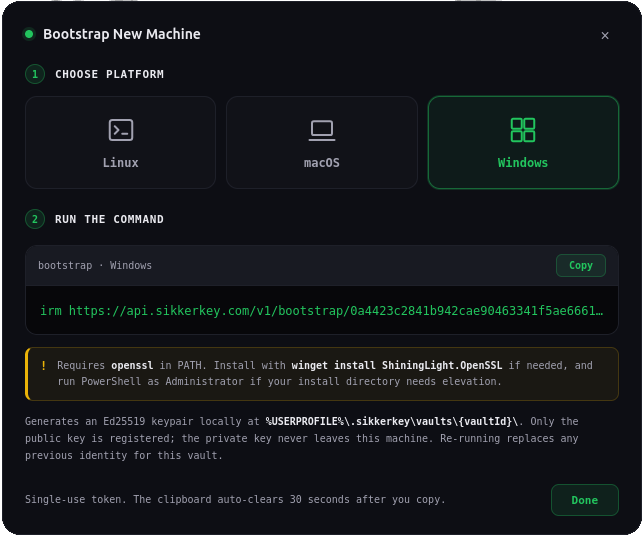
Machine registration uses one-time bootstrap tokens. From the dashboard, you generate a token (valid for 10 minutes, single use). The bootstrap script:
- Generates an Ed25519 keypair on the machine using
openssl genpkey -algorithm Ed25519 - Extracts the raw 32-byte public key
- Sends the public key, the token, and the machine's hostname to
POST /v1/bootstrap/register - Receives back the machine ID and vault ID
- Stores the private key and identity file at
~/.sikkerkey/vaults/{vaultId}/
The private key file is chmod 600. It never leaves the machine.
Newly registered machines start in a pending state (approved = false). They cannot authenticate until the vault owner approves them from the dashboard.
A machine can be registered with multiple vaults. Each vault gets its own directory and keypair under ~/.sikkerkey/vaults/. The SDK resolves which identity to use based on the vault ID you provide.
Secret Types
Secrets
A single encrypted value. Read with getSecret():
val apiKey = sk.getSecret("sk_stripe_key")
Structured Secrets
Multiple named fields encrypted as a single blob. Read with getFields() or getField():
val creds = sk.getFields("sk_db_prod")
val host = creds["host"]
val password = creds["password"]
Fields are stored as a single encrypted blob. The fieldNames metadata stores the field schema so the dashboard can display field names without decrypting.
Managed Secrets
Database credentials that SikkerKey rotates and applies to your database. Always structured with username and password fields. A CLI agent (sikkerkey agent start --secret <id>) runs locally next to your database, monitors for rotations, and executes the appropriate SQL command (e.g. ALTER ROLE ... WITH PASSWORD ... for PostgreSQL) when the password changes.
TTL Secrets
One-time self-destructing secrets for securely sharing credentials with people outside your vault. You paste or generate a value, set a self-destruct timer (1 minute to 24 hours), and receive a link plus a passphrase. The recipient opens the link, enters the passphrase, and sees the secret. It is then permanently destroyed. A wrong passphrase also destroys it immediately. TTL secrets are encrypted with AES-256-GCM, the passphrase is hashed with Argon2id, and machines cannot read them. They exist for human-to-human credential handoff, not programmatic access.
Automatic Rotation
Any secret or structured secret can optionally have automatic rotation enabled. When enabled, SikkerKey generates new values on a schedule (minimum 5 minutes). For structured secrets, you choose which fields rotate and which stay static. Secrets with active rotation cannot be manually replaced or rotated.
Managed secrets always have rotation enabled.
Projects and Access Control
Secrets are organized into projects. A project is a named container with its own encryption key. Every secret belongs to exactly one project.
Machines are added to projects, but adding a machine to a project does not give it access to any secrets. You must separately grant the machine access to specific secrets within that project.
This two-step model means a machine can be part of a "production" project but only have access to the database password, not the Stripe key in the same project.
Teams
Vault owners can invite other SikkerKey users by email. When the invitee accepts, they become a team member of that vault.
Team members are granted access per-project. Adding a team member to a project gives them full secret management access within that project: view metadata, create, delete, replace, version history, and notes. There are no granular secret-level permissions for team members. Project membership is the access boundary.
Machine permissions are separate and granular:
| Permission | What it allows |
|---|---|
machine_view | List machines in the project |
machine_add | Add machines to the project |
machine_remove | Remove machines from the project |
machine_configure | Change which secrets a machine can access |
When a vault owner's account is suspended, all team member access to that vault is blocked immediately.
Audit Log
Every operation writes to an append-only audit log with a severity tag (critical, high, medium, low, info). Each entry records the user ID, machine ID, secret ID, action name, severity, source IP, a detail string, and a millisecond timestamp.
Entries are pushed to the vault owner's dashboard in real time via server-sent events. Email alerts can be configured per-action.
Audit log retention is based on your subscription plan and is pruned automatically.
Version History
When a secret's value is replaced or rotated, the previous encrypted value is preserved. The version number increments with every update. You can rollback to any previous version that hasn't been pruned. A rollback copies the old version's encrypted data back and creates a new version entry, so rollbacks are themselves versioned.
Version retention is based on your subscription plan.
Soft Delete
Deleted secrets are moved to trash. They remain recoverable for 30 days. After 30 days, they are permanently deleted along with all version history. Machine access grants and rotation schedules are removed immediately on deletion.
Next Steps
- Quickstart: register a machine and fetch a secret in 5 minutes
- Concepts: deeper coverage of encryption, permissions, and audit
- Secrets: single-value secrets
- Structured Secrets: multi-field secrets
- Managed Secrets: database credential sync
- TTL Secrets: one-time self-destructing secrets
- CLI Guide: command-line interface reference
- SDK Reference: Kotlin, Go, Python, Node.js, and .NET SDKs