Operations
Export secrets, inject environment variables, and list resources.
export
Export secrets in multiple formats. Uses the batch export endpoint for efficient retrieval (single round trip per project).
# Default: KEY=value format
sikkerkey export

# JSON
sikkerkey export --format json

# Dotenv (quoted values)
sikkerkey export --format dotenv > .env

# YAML
sikkerkey export --format yaml

# Single project only
sikkerkey export --project production --format json
Without --project, exports all secrets across every granted project (or, when an application scope is set with sikkerkey set application, just that application's secrets). An explicit --project overrides any application scope. Structured secrets are flattened: SECRETNAME_FIELDNAME=value.
Formats
| Format | Output |
|---|---|
env | KEY=value (default) |
json | {"KEY": "value"} (pretty-printed) |
yaml | KEY: "value" |
dotenv | KEY="value" (quoted) |
Name Conversion
Secret names are converted to environment variable format:
- Uppercase
- Non-alphanumeric characters replaced with
_ - Consecutive underscores collapsed
- Leading/trailing underscores trimmed
Examples: "Database Password" becomes DATABASE_PASSWORD. "api-key" becomes API_KEY. A structured secret "DB Creds" with field "password" becomes DB_CREDS_PASSWORD.
run
Inject secrets as environment variables and run a command. You must specify which secrets to inject: either specific secrets with --secret or all accessible secrets with --all. With --all and no --project, an active application scope (if set via sikkerkey set application) limits injection to that application.
# Inject specific secrets
sikkerkey run --secret sk_db_password --secret sk_api_key -- node server.js

# Inject all secrets from a project
sikkerkey run --all --project production -- ./deploy.sh

# Inject all accessible secrets
sikkerkey run --all -- python app.py
How it Works
- Fetches the specified secrets (or all with
--all) - Converts each secret to environment variables (see Variable names below)
- Structured secrets expand to one variable per field
- Starts the child process with the combined environment
- Forwards SIGINT and SIGTERM to the child
- Exits with the child's exit code
Variable names
How a variable is named depends on how you selected the secret:
--alluses the secret's name, the same conversionexportuses: a secret namedDB Credswith apasswordfield becomesDB_CREDS_PASSWORD.--secret <id>uses the secret ID: a secret with IDsk_7h2k9xqpand apasswordfield becomesSK_7H2K9XQP_PASSWORD. Selecting secrets by ID keeps them distinct even when two of them share a name.
--prefix applies on top of both.
Watch Mode
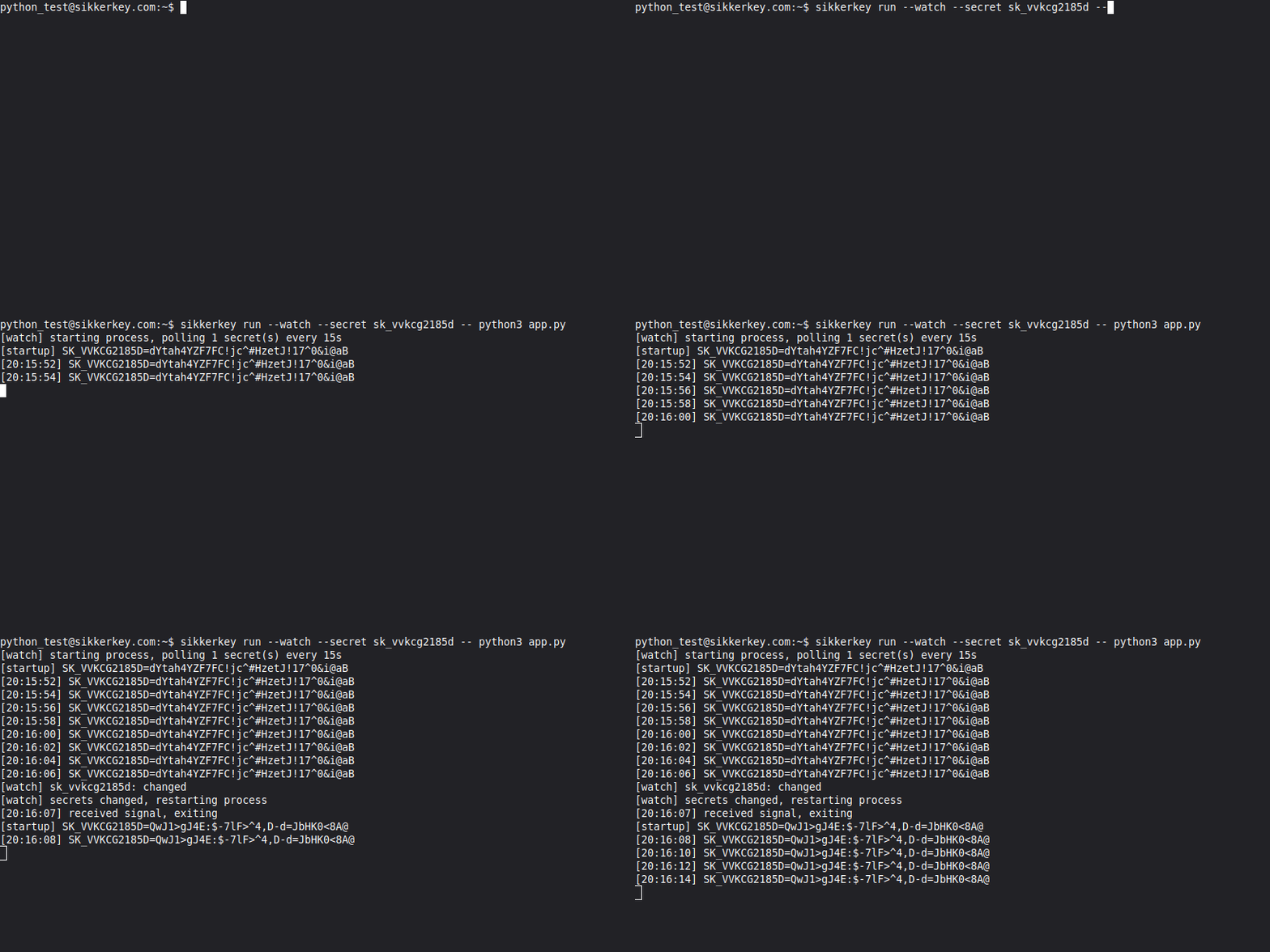
Pass --watch to automatically restart the process when secrets change. The CLI polls for changes every 15 seconds.
# Restart when the secret rotates
sikkerkey run --watch --secret sk_db_password -- node server.js

# Watch all secrets in a project
sikkerkey run --watch --all --project production -- ./my-app
When a change is detected, the CLI sends SIGTERM to the child process, re-fetches the updated secrets, and restarts the process with the new environment variables. If the process exits on its own (crash), the CLI waits for the next secret change before restarting.
Dry Run
Preview what environment variables would be injected without running anything:
sikkerkey run --all --dry-run
sikkerkey run --all --dry-run --show-values
sikkerkey run --secret sk_db_password --dry-run --show-values
Flags
| Flag | Description |
|---|---|
--secret <id> | Inject a specific secret (repeatable) |
--all | Inject all accessible secrets |
--project <name> | Scope --all to a specific project |
--watch | Poll for changes and restart the process automatically |
--prefix <str> | Prefix all injected variable names |
--dry-run | Show variables without running anything |
--show-values | Show actual values in dry-run (default: masked with ****) |
Examples
# Run a Node.js server with two specific secrets
sikkerkey run --secret sk_db_password --secret sk_stripe_key -- node server.js

# Run with prefixed variables (DB_CREDS_PASSWORD becomes MYAPP_DB_CREDS_PASSWORD)
sikkerkey run --all --prefix MYAPP_ -- python manage.py runserver

# Auto-restart on secret rotation
sikkerkey run --watch --all --project production -- ./my-app

# Preview what will be injected
sikkerkey run --all --project production --dry-run
list
List secrets, projects, applications, or vaults.
# All accessible secrets, grouped by application and project
sikkerkey list secrets

# Projects this machine can access, grouped by application
sikkerkey list projects

# Applications grouping those projects (* = current scope)
sikkerkey list applications

# Bootstrapped vaults on this machine (* = default)
sikkerkey list vaults
secrets
Shows every secret the machine can access, grouped by application, then by project. Each entry shows the secret name and ID; structured secrets are marked with [structured]. Secrets whose project has no application appear under "Standalone". When an application scope is set (sikkerkey set application), only that application's secrets are shown.
projects
Shows the projects this machine has been granted access to, grouped by application (projects with no application appear under "Standalone"). Each entry shows the project name and ID. When an application scope is set, only that application's projects are shown.
applications
Shows the applications grouping the machine's accessible projects, with a project count for each. The currently scoped application is marked with *.
vaults
Shows all bootstrapped vault identities on this machine. The currently active vault is marked with *.